SNMP network monitoring without opening ports
Sergward monitors switches, UPS units, printers, firewalls and NAS boxes over SNMP v1, v2c and v3 from the agent already on a server in that network, so nothing is opened from outside. It sweeps a subnet, recognises what it finds, reads ports, batteries and toner, accepts vendor MIB files and alerts by email. Free during the beta.
Free during the beta. Leave your details and we write to give you access.
- 18
- fingerprints to recognise what a sweep finds
- 7
- OID templates, plus your own OIDs and MIB files
- 20 MB
- per vendor MIB file you can upload
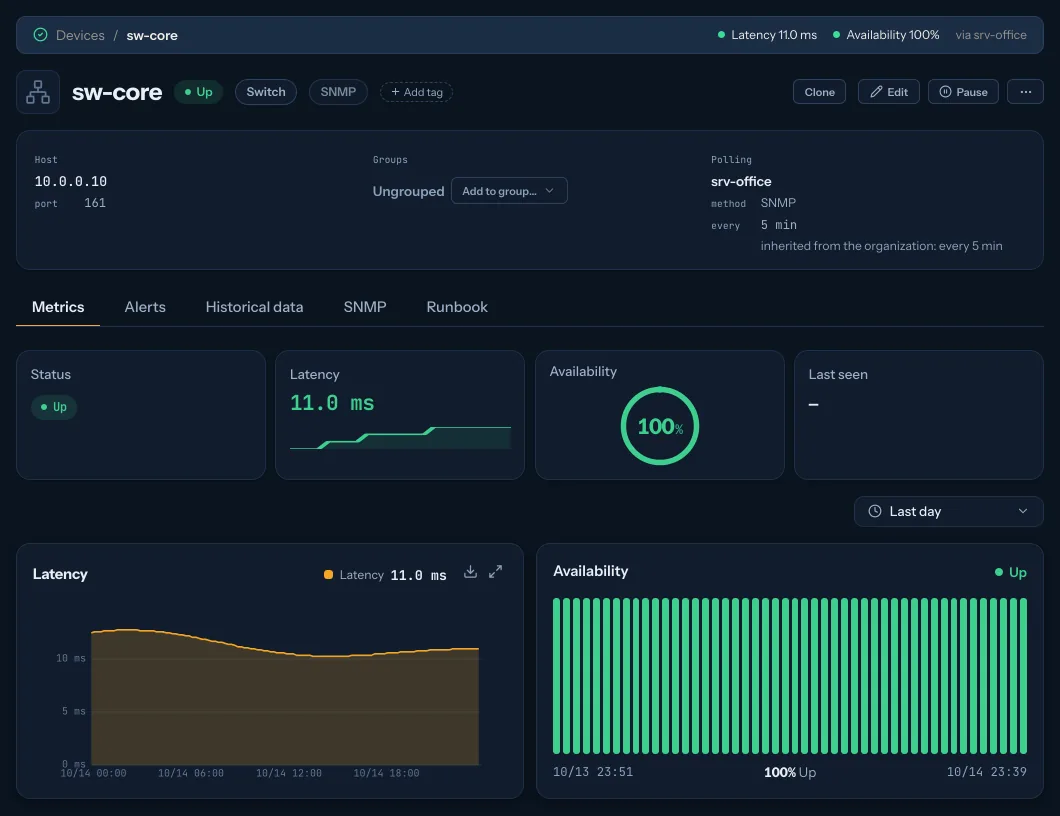
What it reads from the network
The agent on a server in that network does the querying. Devices that will not take an agent are watched from there.
- Discovery
- Sweeps a subnet, on demand or on a schedule, and recognises vendor and type from 18 fingerprints: Cisco, HPE iLO, APC, HP printers, Windows and Linux among them.
- 192.168.10.2 · sw-core · Switch · Cisco
- Switch ports
- Status and traffic of every port in bits per second, with errors and discards.
- port 24 · up · 412 Mbit/s
- UPS units
- Battery charge, minutes of runtime left, output load and whether it is running on battery.
- ups-rack · on mains · 100 % · 38 min
- Printers
- The level of every toner and supply, before it runs out.
- printer-2 · black toner 12 %
- Temperature and hardware
- Temperature sensors and, on Cisco, the state of fans and power supplies.
- sensor inlet · 27 °C
- Your vendor's MIB
- Upload the vendor's MIB files, up to 20 MB each, and pick what to measure. Sergward says which module is missing, and can walk the device to show every OID it answers.
- PowerNet-MIB · 7,430 objects read
Alerts from the network
These come switched on. This is the text they arrive with.
Interface errors and discards, UPS runtime, sensor temperature, printer supplies and packet loss come switched off: each one starts working when you give it a threshold. When the gateway goes down, the devices behind it stay quiet and one email goes out.
- CriticalDevice unreachableA device stops answering the agent that polls it.
sw-core did not respond - CriticalLink downA switch port that was up goes down.
Link sw-core port 17 went down - WarningUPS on batteryThe UPS reports it is running on battery.
UPS on battery: mains power is gone - CriticalUPS batteryThe battery charge drops below the threshold: 30 % by default.
UPS battery at 28% - CriticalChassis environmentOn Cisco, a fan or power supply reports a warning or stops working.
Fan Switch#1, Fan#2 is not working
How it reaches the devices
Inbound, nothing. The agent only connects outbound over HTTPS and queries the devices from inside the network.
The platform does not ping from outside: ping comes from an agent inside the network.
- Install the agent on any server or PC in that network, the same way as for a server, and approve it from the portal.
- In Devices, sweep the subnet or add a device by address, with its SNMP version and its community or v3 user.
- Pick what to read: the templates the fingerprint suggests, your own OIDs or the ones from your vendor's MIB.
- The first reading arrives on the next poll. Devices with a public address can also be polled from the Sergward platform over SNMP or TCP.
Install the agent
$ curl -fsSL https://app.sergward.com/install.sh | sudo shDevices › Discover · 192.168.10.0/24 · SNMP v3 · authPriv · SHA / AES
SNMP v1, v2c and v3
Every security level the protocol defines, with the algorithms the agent supports today.
- v1 and v2c
- With a community string. v3 fields are not sent with them, and the community is not sent with v3.
- v3 security levels
- noAuthNoPriv, authNoPriv and authPriv, with a username per device.
- Algorithms
- Authentication with MD5 or SHA, privacy with DES or AES. SHA-2 and AES-192 or AES-256 are not supported.
- Traps and syslog
- An optional receiver for SNMP traps and syslog messages. It comes switched off.
Priced like any machine
A switch, a UPS or a printer counts the same as a server with an agent.
- One price per device
- After the beta, up to 10 machines are free and every machine above that is paid, with an agent or without one.
- Next to the servers
- Devices sit in the same customer space as the servers, websites and backups, on the same dashboards and alerts.
What it does not do
Said before you ask.
- Traffic flows
- It measures traffic per port, not who talks to whom: no NetFlow or sFlow.
- Device configuration
- It does not back up or change switch configurations.
- Newer v3 algorithms
- No SHA-2 and no AES-192 or AES-256 for SNMPv3.
- Ping from outside
- The platform polls public devices over SNMP and TCP but never pings; ping comes from an agent.
Frequently asked questions
Do I need to open ports on the network?
No. The agent queries the devices from inside the network and only connects outbound over HTTPS. Only devices with a public address can be polled from the platform, over SNMP or TCP.
Which SNMP versions are supported?
v1, v2c and v3. For v3: noAuthNoPriv, authNoPriv and authPriv, with MD5 or SHA authentication and DES or AES privacy.
Can I use my vendor's MIB?
Yes. Upload the MIB files, up to 20 MB each, and pick the OIDs to measure. Sergward reads up to 10,000 objects per file and says which module is missing if one depends on another.
Does it receive SNMP traps?
There is an optional receiver for SNMP traps and syslog. It comes switched off.
Does a switch count toward the price?
Yes, like any machine: after the beta, up to 10 machines are free and every machine above that is paid, with or without an agent.
Join the waitlist
While the beta lasts we give access a few at a time, by hand. Leave your details and we will write to you.
- 1You leave your name and email.
- 2We write to give you access.
- 3You install the first agent.