Proxmox monitoring for MSPs and IT teams
Sergward monitors Proxmox VE with an agent on the node that reads the local API through a read-only token. It watches nodes, virtual machines, containers, storage, quorum, replication, ZFS pools, certificates and the last vzdump backup of every guest, and emails you when one of twelve built-in conditions fails. It is free during the beta.
Free during the beta. Leave your details and we write to give you access.
- 12
- alerts come configured
- 8006
- the port that stays closed to the outside
- 1
- machine counted per node, however many VMs it runs
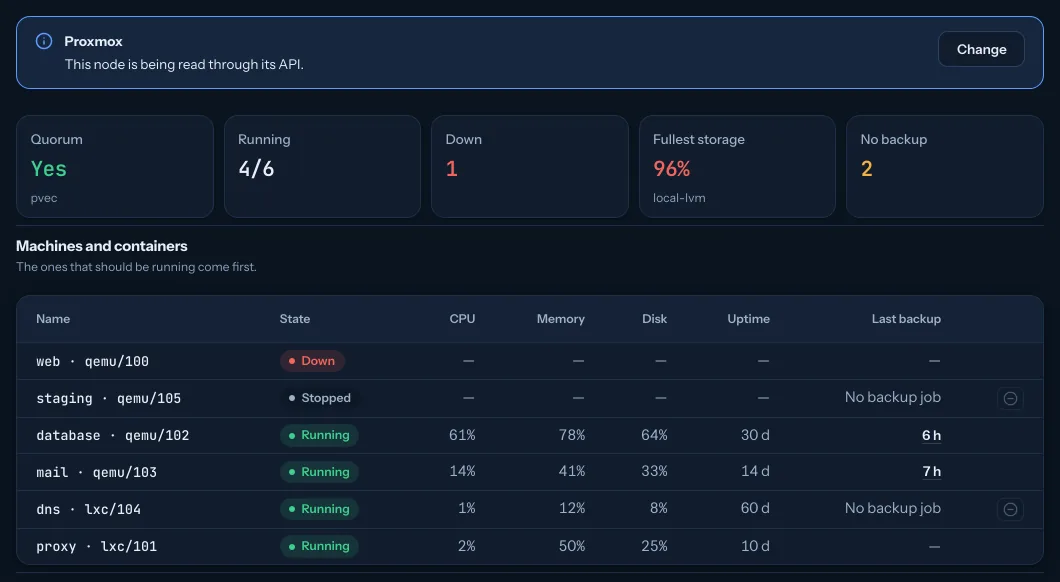
What Sergward reads from Proxmox VE
The agent asks the node's own API, the same one the web interface uses. Nothing is installed inside the virtual machines, and port 8006 never has to be opened to the outside.
CPU and memory per VM, container and node, and storage usage, are kept as history and can be charted on a dashboard next to your other machines.
- Nodes
- CPU, memory, uptime and version. Every ZFS pool's health and fill, the days left on the node certificate, the subscription and, if the token allows it, pending updates.
- pve-01 · zfs rpool online · cert 212 d
- Virtual machines and containers
- Whether each one is running, its CPU, memory and uptime, and each container's disk. Whether it starts at boot, whether it is locked, and its HA state.
- vm 104 erp · running · onboot · ha started
- Storage
- How full each storage is, in percent and in bytes.
- local-lvm · 71 % · 1.2 of 1.7 TB
- Cluster
- Quorum, the QDevice, and every replication job: how long it took, how many syncs failed and when it last synced.
- quorum ok · qdevice · 104-0 synced 4 min ago
- Backups
- For each guest, its last good vzdump backup, its age and size, and whether the last attempt failed. For each node, how its last job ended. And the guests no job includes.
- vm 104 · last good 23 h ago · 18.4 GB
- What could not be read
- If a part of the API cannot be read, Sergward names the part and the reason instead of showing it as empty.
- updates · not read: token lacks Sys.Modify
Twelve alerts that come configured
They work from the first reading. Each one can be switched off, and the two that depend on a number use the same thresholds as your other servers. This is the text each one arrives with.
Alerts go out by email. A maintenance window on the node keeps them quiet while you work on it.
- CriticalCluster quorum lostThe cluster reports it has no quorum.
Proxmox cluster pve-cluster lost quorum - CriticalGuest not runningA VM or container set to start at boot is stopped.
Proxmox guest billing should be running and is not - CriticalGuest without HA protectionA guest managed by HA is in error, fence or recovery.
Proxmox guest erp: HA is error - CriticalZFS pool degradedA node reports a pool that is not online.
Proxmox ZFS pool tank on node pve-02 is degraded - CriticalBackup too oldA guest's last good backup is older than the limit: 26 hours by default.
Proxmox guest erp: last backup 31 h ago - CriticalBackup job failedA node's last vzdump job ended in error.
Proxmox backup job failed on node pve-01 - WarningBackup failed verificationThe backup storage reports the last backup did not pass verification.
Proxmox guest erp: last backup failed verification - WarningGuests without backupThere are guests that no backup job includes.
Proxmox: 2 guests with no backup - WarningStorage almost fullA storage goes over the disk threshold: 90 % by default.
Proxmox storage local-lvm at 91% - WarningReplication failingA replication job has failed syncs.
Proxmox replication 104-0 failing: 3 syncs - WarningNode certificate expiringThe certificate expires within the threshold: 14 days by default.
Proxmox node pve-01 certificate expires in 9 days - WarningProxmox API not readableThe agent cannot read the API, with the reason: certificate, credential or permission.
Proxmox API cannot be read: permission
What Proxmox already tells you, and what it cannot
Proxmox VE sends its own notifications for a few events. They come from the job that ran, so they cannot report a job that never ran or a node that went quiet.
| Situation | Proxmox VE notifications | Sergward |
|---|---|---|
| A backup job fails | Yes | Yes |
| A guest is in no backup job | No | Yes |
| A guest's last good backup is too old | No | Yes |
| A replication job fails | Yes | Yes |
| A node is fenced | Yes | Each guest's HA state |
| The cluster loses quorum | No | Yes |
| A ZFS pool is degraded | No | Yes |
| A storage is almost full | No | Yes |
| A node certificate is about to expire | No | Yes |
| The node stops reporting | No | Yes |
Source: Proxmox VE notification events, from the Proxmox VE documentation, read on 14 October 2026.
Set up in four steps
One agent per node and one read-only token. No VPN, no port forwarding.
With PVEAuditor, pending updates stay unread, because Proxmox asks for Sys.Modify to list them. Sergward says so instead of showing zero.
- Install the agent on the node with the same command as on any Linux server, and approve it from the portal with the code it shows.
- In Proxmox, create an API token and give it the PVEAuditor role on path /, with Propagate checked. Proxmox creates tokens with Privilege Separation checked, so the token does not inherit its user's permissions.
- Open the host in the portal. It detects that the machine is a Proxmox node and asks for the endpoint and the token.
- The first reading arrives with the next report. If something fails, the agent's check says which step: it cannot reach the node, the token is rejected, or it lacks a permission.
Install the agent
$ curl -fsSL https://app.sergward.com/install.sh | sudo shDatacenter › Permissions › Add › API Token Permission · Path / · Role PVEAuditor · Propagate ✓
One screen for every customer
Each customer is a space in your organisation, with its own machines, alerts and people. A Proxmox node sits next to that customer's servers, switches, websites and backups, so a stopped VM and the full storage behind it show up on the same screen.
- Priced per node
- After the beta you pay per monitored machine. The node counts; its virtual machines and containers do not.
- History for every guest
- CPU, memory and storage per VM and node on the same dashboards as the rest of the customer's machines.
What it does not read
Said before you ask.
- Proxmox Backup Server
- Sergward reads the vzdump backups each node makes and the storage they land on, not the backup server's own datastores and jobs.
- Traffic per guest
- Network and disk throughput per VM are not collected.
- Snapshots
- Their age is not checked.
- Ceph
- Ceph health is not read.
Frequently asked questions
Do I need to install anything inside the virtual machines?
No. The agent on the node reads everything from the Proxmox API. If you also want what happens inside a VM, such as its disks, services and processes, install the agent in it as on any server; that VM then counts as a monitored machine.
What permissions does the token need?
The PVEAuditor role on path /, which is read-only. Listing pending updates needs Sys.Modify; without it Sergward shows the updates as not read instead of zero.
Does it work with a cluster?
Yes. Quorum, the QDevice and replication come from the cluster's API, and VMs and containers are shown with the node they run on.
Does it monitor Proxmox Backup Server?
It reads the backups each node makes with vzdump, wherever they are stored, and whether the storage verified them. It does not read the backup server's own datastores and jobs.
How much does it cost?
Nothing during the beta. After it, up to 10 machines are free; above 10, every machine is paid. A Proxmox node counts as one machine; its VMs and containers do not count.
Join the waitlist
While the beta lasts we give access a few at a time, by hand. Leave your details and we will write to you.
- 1You leave your name and email.
- 2We write to give you access.
- 3You install the first agent.