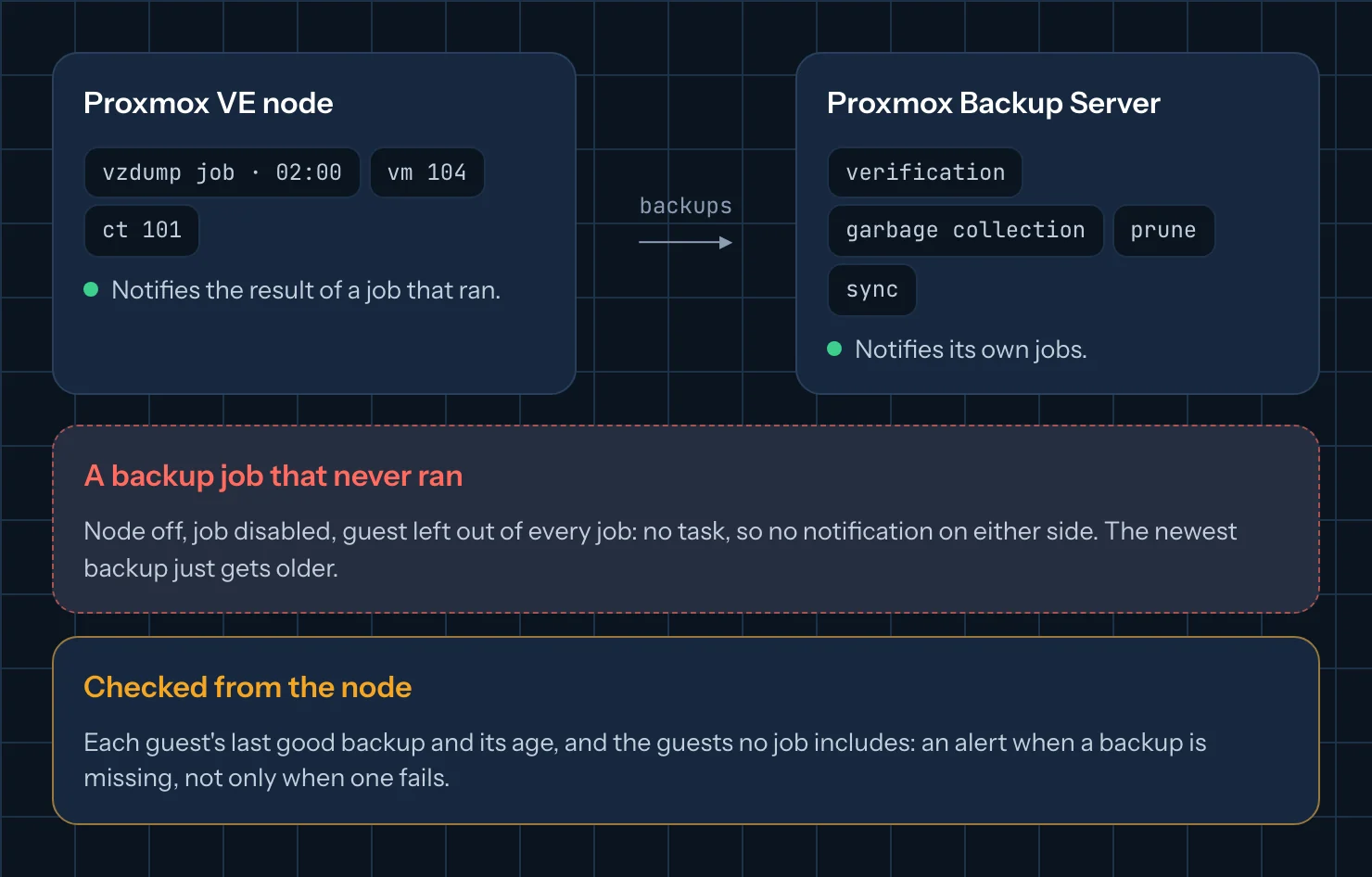
Proxmox Backup Server keeps your backups. It does not know which backups it should have received. Monitoring it well means watching two places: the jobs that run on the backup server, and the backup jobs that run on each Proxmox VE node and send data to it.
What can go wrong
Five things break backups on Proxmox Backup Server, and they are noticed in different places:
| What happens | Who notices by default |
|---|---|
| The backup job on a node fails | Proxmox VE, if its job notifications are set up |
| The backup job never runs: node off, job disabled, guest left out | Nobody |
| A stored backup gets corrupted on disk | The backup server, when a verification job runs |
| The datastore fills up and new backups fail | Nobody, until the next backup fails |
| The copy to a second server stops | The backup server, if sync jobs notify |
The second and fourth rows are the dangerous ones: nothing fails loudly, the backups just stop being new.
Check the jobs the backup server runs
The backup server runs four kinds of job on its own. Each one has a command that shows its configuration or its state. All of them run on the backup server as root.
Verification
Verification reads each snapshot back and checks it against its checksums. It is the only way to find a backup damaged on disk before you need it.
proxmox-backup-manager verify-job listThe documentation recommends two jobs: a frequent one (hourly or daily) for new snapshots, and one that re-verifies everything at least once a month, because disks degrade over time.
Garbage collection
Pruning only marks snapshots as removed. Garbage collection is what frees the space. If it stops, the datastore fills up even though old snapshots are pruned.
proxmox-backup-manager garbage-collection status store1Prune
Prune jobs apply the retention you set: how many daily, weekly and monthly snapshots to keep.
proxmox-backup-manager prune-job listSync
Sync jobs copy a datastore to or from another backup server. If yours is the off-site copy, a stopped sync means the second copy is getting old.
proxmox-backup-manager sync-job listEvery recent task, with its result
The task list is the quickest way to see what ran and what failed. Without --all it shows only running tasks.
proxmox-backup-manager task list --all --limit 20
proxmox-backup-manager task log 'UPID:...'
Watch the space on each datastore
A full datastore turns every backup into a failure. Check its usage and, on the backup server’s disks, their SMART attributes:
proxmox-backup-manager datastore list
proxmox-backup-manager disk smart-attributes sda
Send the failures somewhere you read
The backup server sends notifications through targets (sendmail, SMTP, Gotify or a webhook) chosen by matchers. These are the events it can send, according to its documentation:
| Event | Type |
|---|---|
| Verification job failed or succeeded | verification |
| Garbage collection failed or succeeded | gc |
| Prune job failed or succeeded | prune |
| Sync job failed or succeeded | sync |
| Tape backup job failed or succeeded | tape-backup |
| Certificate renewal failed | acme |
| Package updates available, only with an active subscription | package-updates |
Two commands confirm the setup works before you rely on it:
proxmox-backup-manager notification target list
proxmox-backup-manager notification target test mail-to-team
Route at least the failures of verification, gc, prune and sync to a target someone reads every day.
Check that every guest has a recent backup
This is the check the backup server cannot do. It has to come from the Proxmox VE side, where the backup jobs are defined.
First, the guests that no backup job includes. The Proxmox VE API lists them:
pvesh get /cluster/backup-info/not-backed-upThen, the age of each guest’s last backup. On the backup server, proxmox-backup-client lists the backup groups in a datastore and the snapshots of each group:
proxmox-backup-client list --repository 'monitor@pbs@pbs01:store1'
proxmox-backup-client snapshot list 'vm/104' --repository 'monitor@pbs@pbs01:store1'
Compare the newest snapshot of each guest with how often its job runs. A nightly job whose newest snapshot is 30 hours old has missed a night, even if nothing reported an error.
A checklist to keep
| Check | How often |
|---|---|
| Verification jobs succeed | Daily |
| Every guest is in a backup job | Daily |
| Each guest’s newest backup is younger than its schedule plus a margin | Daily |
| Garbage collection runs and the datastore has space | Daily |
| Sync to the second server is recent | Daily |
| Everything is re-verified | Monthly |
| A real restore works | Monthly or quarterly |
How Sergward helps
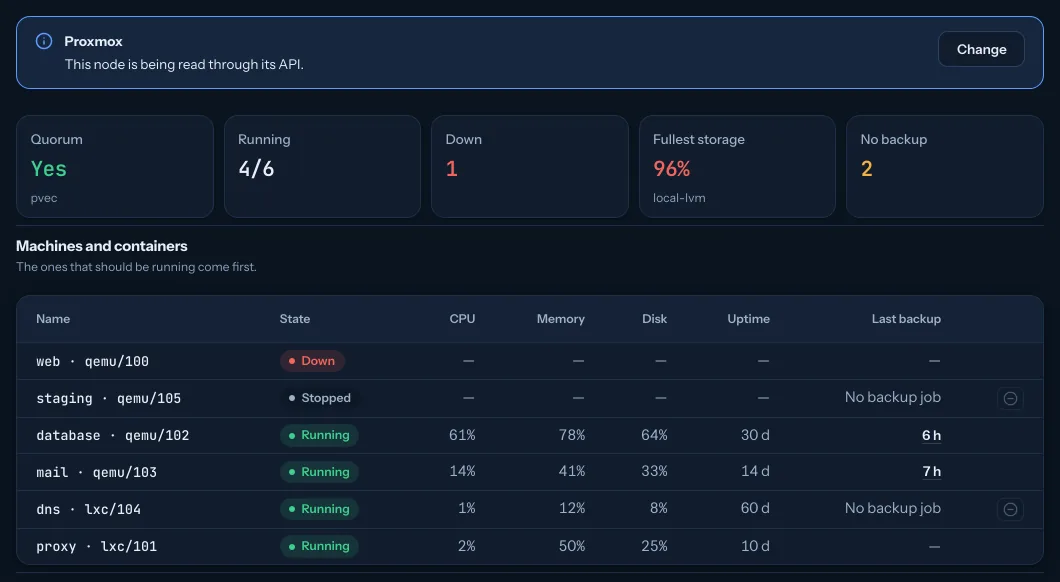
Sergward’s agent runs on each Proxmox VE node and reads the backup side with a read-only token: every guest’s last good vzdump backup, its age and size, whether the last attempt failed, whether the storage verified it (on storages that verify, such as a Proxmox Backup Server datastore), the guests in no backup job and how each node’s last job ended. It alerts when a guest’s last good backup is older than 26 hours by default, when a job fails, when verification fails and when a guest is left out.
It does not read the backup server’s own garbage collection, prune, sync or verification jobs. For those, use the server’s notifications as described above.
Sources, read on 15 October 2026
- Proxmox Backup Server documentation: command syntax (
proxmox-backup-manager,proxmox-backup-client) - Proxmox Backup Server documentation: maintenance tasks, verification
- Proxmox Backup Server documentation: notifications and notification events
- Proxmox VE API viewer:
/cluster/backup-info/not-backed-up
Frequently asked questions
Does Proxmox Backup Server alert when a backup does not arrive?
No. Its notifications cover its own jobs: verification, garbage collection, prune, sync, tape, certificate renewal and package updates. A backup that a Proxmox VE node never sent is not an event on the backup server.
How often should backups be verified?
The Proxmox Backup Server documentation recommends a frequent verification job for new and expired snapshots, plus re-verifying all backups at least once a month, because disks degrade over time.
Which command shows the jobs that failed?
proxmox-backup-manager task list --all lists recent tasks with their status, including the stopped ones; proxmox-backup-manager task log followed by the task ID shows what happened.
Can Sergward monitor Proxmox Backup Server?
It reads the backup side from each Proxmox VE node: every guest's last good vzdump backup, its age and size, whether the storage verified it and the guests in no backup job. It does not read the backup server's own jobs; use its notifications for those.